Wallet Activation Prompt
SCR-WALLET-01 · Wallet & Payments
ScopedFigma
1465:9200design drifted since last syncLayout
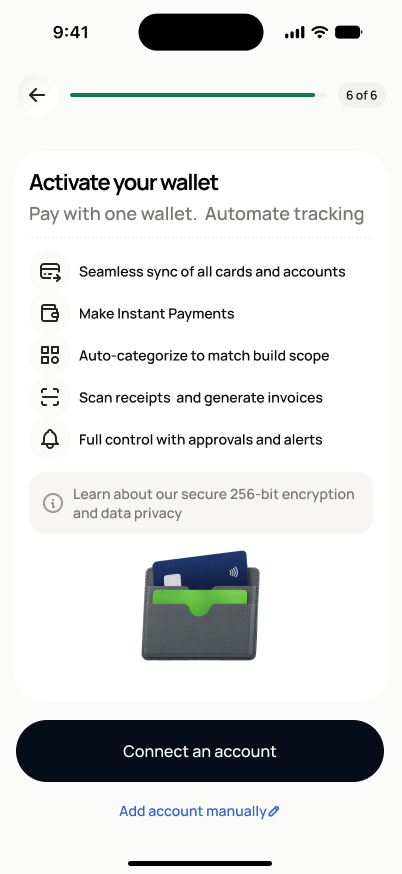
Prompt state: progress badge ("★ 4 of 4" in Fast Track), one white card with bold "Activate your wallet" headline + subtext, 5 benefit rows (icon + one line each), a gray info chip ("Learn about our secure 256-bit encryption and data privacy"), a wallet/card illustration, then a full-width black "Connect an account" button with an "Add account manually" text link below it. Activating state: full-bleed, no nav, centered 3D stacked-cards icon, "Activating wallet…" headline + subtext, no interactive elements. Activated state: rendered as a bottom sheet (drag handle, "X" close), centered 3D card-with-crown icon, "Wallet is activated" headline + subtext, full-width black "Continue to review" button.
States
- **Default**: all actions visible and tappable.
- **Activating (in progress)**: transient loading state, no interaction, auto-advances to Activated.
- **Activated**: success state, "Continue to review" proceeds onward (SCR-SETUP-11 in Fast Track).
- **Skip confirmed**: not a separate screen — choosing skip proceeds directly onward with wallet status recorded as incomplete, not shown as an error or dead end.
Acceptance criteria
- The screen explains what wallet activation enables — one wallet for project payments, automatic tracking, and organization — before any choice is required.
- Four actions are available: activate, connect an account, add an account manually, or skip.
- Tapping "Activate Dovel Project Card" navigates to SCR-WALLET-02.
- Tapping "Connect an account" or "Add manually" navigates to SCR-WALLET-03.
- Tapping "Skip for now" proceeds without blocking project creation and records wallet status as incomplete for later prompting.
- A source being attached (via SCR-WALLET-02 or SCR-WALLET-03) shows an "Activating…" transient state, then a "Wallet is activated" success state before proceeding.
Endpoints
None mapped yet — the backend agent will own these.