Fast Track Review & Create
SCR-SETUP-11 · Project Setup
ScopedFigma
311:38615design drifted since last syncLayout
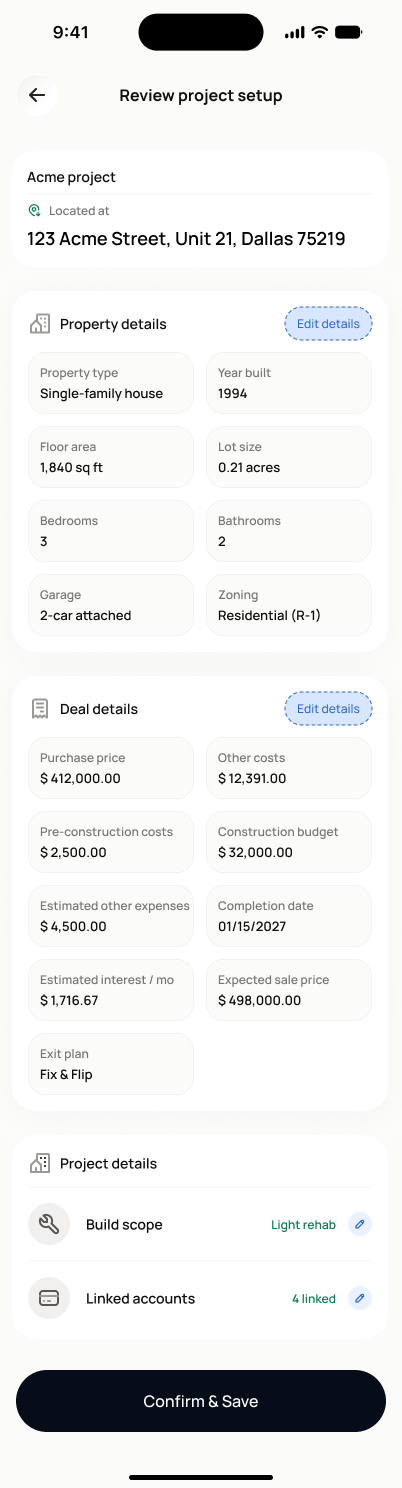
Back arrow + "Review project setup" header title, no progress badge. Each section is its own white card: a leading icon, section title, and an "Edit details" pill button top-right; content below varies by section (2-column field grid for Property details/Project cost/Profitability, a single selector row for Exit plan, an icon+label+tag row for Project build scope, a list of bank-icon rows for Connected accounts). Full-width black "Confirm & Save" button at the very bottom.
States
- **Default**: all captured sections shown with values; skipped sections listed separately and explicitly, never folded into the completed list *(not visible in the reviewed mock — see Design note)*.
- **Editing**: tapping "Edit details" on any section routes to it with existing values pre-filled, then returns here.
- **Created**: routes to a confirmation screen and then the project dashboard.
Acceptance criteria
- The screen shows property details, simplified P&L (as Project cost / Profitability / Exit plan cards), build scope, wallet/account status, and an explicit list of sections that were skipped.
- Any section can be edited via its "Edit details" button, returning the user to this review screen afterward.
- Tapping "Confirm & Save" creates the active project with `setup_route = fast_track` and confidence level `estimated`.
- A confirmation screen appears after creation and routes the user to the project dashboard.
- Follow-up tasks for every skipped section are created automatically at the same time as the project.
Powered by — endpoints · the Backend agent owns these
POST /projects