Deal Details, Exit Plan & P&L Capture
SCR-SETUP-10 · Project Setup
LiveFigma
1541:10990Layout
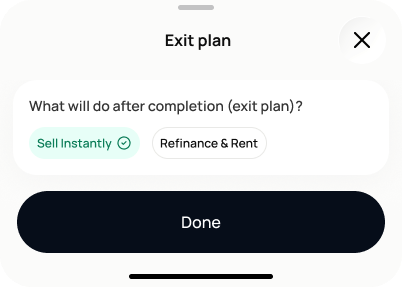
Persistent shell across all 3 sub-slides: back arrow + progress badge, a 3D icon (cash/bills), headline "Let's capture the P&L" + "Use your best guess. You can refine these later," a 3-dot sub-step indicator, then the project name/address summary card, then the fields for that sub-slide in a labelled white card with a "Required" tag on the card header, each field showing an info icon + one-line helper text below it. Bottom "Next" (slides 1–2) or "Continue" (slide 3, after exit-plan selector) button. The edit-mode entries (reached from `SCR-SETUP-11`/`SCR-SETUP-07`) render the same field cards without the intro headline/icon, more compact — **as of 2026-07-15, the Profitability edit-mode card also dropped its "Profitability"/"Required" card-header labels, showing just the field group title.** Treating this as a cosmetic edit-mode simplification (the fields already have values by the time you're editing) rather than a change to whether they're required — the Full Setup required-field rule below is unaffected.
States
- **Default**: empty fields.
- **Fast Track — required fields**: purchase price and estimated construction budget only; the rest are optional *(inferred from the mock's "Required" tag placement — flagging as unverified copy, not confirmed)*. Forecast calculated once both are filled, labelled "Estimated — low confidence."
- **Full Setup — required fields**: purchase price, pre-construction costs, estimated construction budget, expected completion date, and expected sale price are all required (per DOV-015-AC5); exit plan selection is required before continuing (DOV-016-AC2).
- **Warning (Full Setup, non-blocking)**: expected sale price below estimated total cost, or expected completion date in the past — both show a warning but do not block continuing (DOV-015-AC3/AC4).
- **Post-confirmation edit**: purchase costs, financing, or actual spend confirmed elsewhere later — P&L preview label updates from "Preliminary estimate"/"Estimated — low confidence" toward actual vs. budget variance (DOV-017-AC4).
Acceptance criteria
- The screen asks for, across 3 sub-slides: property purchase price, other purchase costs, pre-construction costs, estimated construction budget, estimated other expenses, expected completion date, estimated monthly interest cost, expected sale price, and exit plan ("Sell Instantly" / "Refinance & Rent").
- On Fast Track, only purchase price and estimated construction budget are required; the remaining fields are optional.
- Once the required fields are filled, Dovel calculates an early forecast labelled "Estimated — low confidence".
- After the project is created, any detailed sections skipped on this screen appear as dashboard follow-up tasks.
- On Full Setup, purchase price, pre-construction costs, estimated construction budget, expected completion date, and expected sale price are all required; empty required fields show validation messages when the user tries to continue.
- All currency fields accept positive values with decimals.
- An expected sale price lower than estimated total cost shows a non-blocking warning.
- An expected completion date in the past shows a non-blocking warning.
- Values entered here are stored as "user-entered", even where Dovel has imported similar values from property records.
- The exit plan selector offers exactly two options: "Sell Instantly" and "Refinance & Rent." One option must be chosen before continuing past the exit-plan sub-slide.
- Choosing "Sell Instantly" sets the project to use a resale/flip model for P&L calculations; choosing "Refinance & Rent" stores that intent for later BRRRR-specific tracking.
- Changing the exit plan after it was already set recalculates every affected forecast value.
- Once purchase price, estimated construction budget, and expected sale price are all saved, the P&L preview calculates and shows an initial estimated profit/loss, labelled "Preliminary estimate" until purchase costs, financing, and actual spend are confirmed elsewhere.
- Updating the construction budget updates the estimated profit automatically, without a separate recalculation step.
- Missing optional data (e.g. purchase costs not yet entered) is never silently treated as zero — the preview labels exactly which cost categories are not yet included.
- Reached again via SCR-SETUP-11's or SCR-SETUP-07's "Edit details" action, the screen opens directly at the relevant sub-slide (project cost / profitability / exit plan) rather than at slide 1.
Powered by — endpoints · the Backend agent owns these
POST /projects/{project_id}/deal-details