Project Created Confirmation
SCR-SETUP-08 · Project Setup
LiveFigma
1515:8898Layout
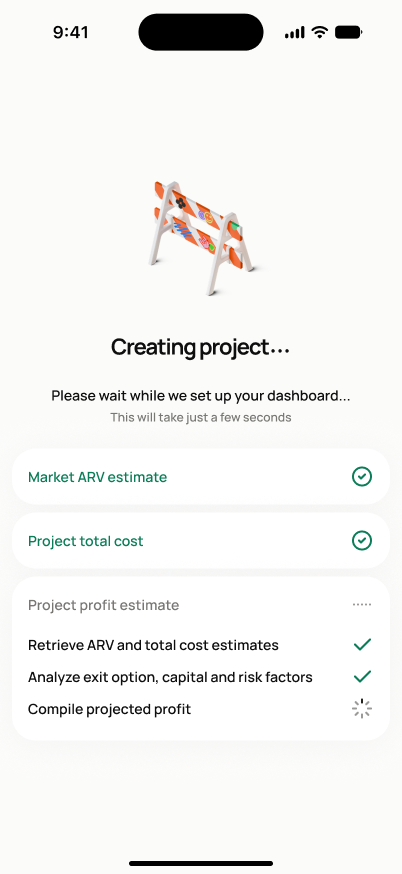
**Creating state**: full-bleed light background (no nav), centered 3D barrier icon, bold "Creating project…" headline + gray subtext ("Please wait while we set up your dashboard… This will take just a few seconds"), then 3 white cards: an "ARV estimate" card with 4 checklist steps (checkmark or spinner per step), a "Project total cost" card, and a "Project profit estimate" card (both collapsed/pending until ARV resolves). **Success state**: full-bleed dark-navy background, centered 3D under-construction illustration, bold white two-line headline "Project created! Let's start tracking," single full-width white "Go to dashboard" button.
States
- **Creating (in progress)**: runs the ARV/total-cost/profit-estimate computation live; each checklist step advances independently; user cannot interact or navigate away during this state.
- **Success**: shown immediately after project creation and computation succeed.
- **Failure**: this screen never renders — the user instead stays on SCR-SETUP-07 (Full Setup) or SCR-SETUP-11 (Fast Track) with an error and a retry option.
Acceptance criteria
- Tapping "Create project" on SCR-SETUP-07 (or "Confirm & Save" on SCR-SETUP-11) creates the active project record from all confirmed setup data.
- A "Creating project…" state runs ARV, total-cost, and profit-estimate computation before the success confirmation appears — this is never skipped, even if the computation is fast.
- This confirmation screen appears immediately after successful creation and computation.
- If creation fails, this screen does not appear — the user stays on SCR-SETUP-07 or SCR-SETUP-11 with an error message and a retry option.
- After successful creation, the user is routed to the project dashboard or the next best action.
- Rapid repeated taps of "Create project"/"Confirm & Save" result in exactly one project being created — double-submit is prevented.
Powered by — endpoints · the Backend agent owns these
POST /projects