Review Imported Property Records
SCR-SETUP-05 · Project Setup
LiveFigma
1541:11000Layout
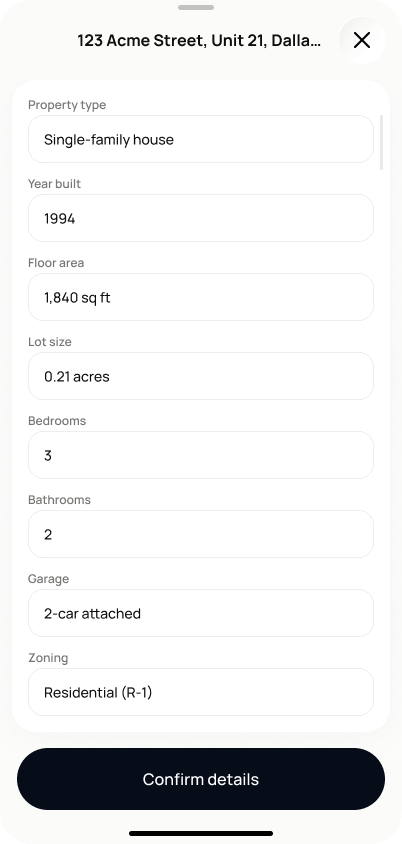
Review state: back arrow + "1 of 4" badge (Fast Track), a green checkmark icon + "Property found" headline, a card with the project name/address, then a "Property details" card with an "Edit details" pill button and the 8 fields in a 2-column grid, "Confirm details" button at the bottom. Editing state: renders as a bottom sheet over the review screen — drag handle, address truncated in the header, "X" to close, all 8 fields as single-column editable inputs, "Confirm details" button pinned at the bottom of the sheet.
States
- **Review (default)**: fields read-only, populated from the search (or empty where not found).
- **Editing**: fields editable in a bottom sheet; closing/saving returns to review mode with updated values.
- **Confirmed**: property details section marked complete; user proceeds to SCR-SETUP-06 (Full Setup) or SCR-SETUP-10 (Fast Track).
Acceptance criteria
- All imported fields are shown: property type, year built, floor area, lot size, bedrooms, bathrooms, garage, and zoning.
- Tapping "Edit" makes the fields editable.
- Saving changes returns the screen to review mode showing the updated values.
- Any field the user edits is stored with a "user-edited" source flag, even if that flag isn't visually shown on screen.
- Tapping "Confirm details" marks the property details section as complete and proceeds to SCR-SETUP-06 (Full Setup) or SCR-SETUP-10 (Fast Track).
- Missing imported values are rendered as visibly empty fields, never hidden or omitted from the layout.
Powered by — endpoints · the Backend agent owns these
POST /projects/{project_id}/property/confirm