Property Details
SCR-SETUP-03 · Project Setup
LiveFigma
336:47661Layout
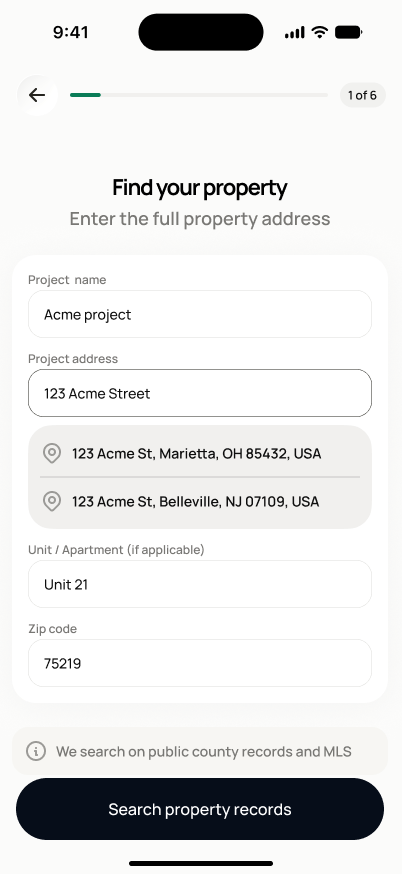
Top: back arrow + progress bar with a step badge ("1 of 4" in Fast Track). Bold headline "Find your property" + gray subtext. One white card with all 4 fields; the address field shows a typeahead dropdown of address matches once text is entered. Gray info chip below the card ("We search public records and MLS data"). Full-width bottom button, disabled/gray until required fields are filled, then solid black.
States
- **Default**: empty fields.
- **Duplicate project name**: non-blocking warning shown, continuing is still allowed.
- **Invalid ZIP**: inline field error, blocks continuing.
- **Manual-entry chosen**: routes directly to SCR-SETUP-06 (Full Setup) or SCR-SETUP-10 (Fast Track) without attempting a search.
Acceptance criteria
- Project name, property address, unit/apartment number (optional), and ZIP fields are all present.
- Project name and property address are required — searching or continuing is blocked until both are filled.
- ZIP/postcode is validated against the correct format for the market (e.g. 5-digit US ZIP) before continuing.
- Entering a project name that already exists for the account shows a warning, but does not block continuing.
- "Skip and enter manually" bypasses the public record search and proceeds directly to the next step.
Endpoints
None mapped yet — the backend agent will own these.