Full Setup Overview
SCR-SETUP-02 · Project Setup
ScopedFigma
336:48100design drifted since last syncLayout
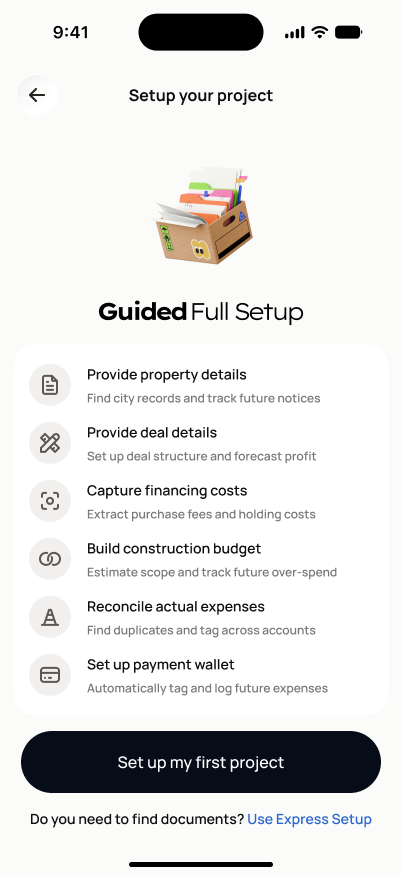
Back arrow + "Setup your project" header (no step badge — this is the pre-step-1 landing, same pattern as SCR-SETUP-09). Centered 3D document-box icon, bold "Guided Full Setup" title. One white card listing the 6 steps, each a row with circular icon, bold label, gray description. Full-width black "Set up my first project" button, "Do you need to find documents? Use Express Setup" text link below it.
States
- **Default**: all six steps listed as upcoming/not started.
- **Returning mid-setup**: steps already completed show a completed indicator; the "Start full setup" action becomes "Continue setup" and routes to the first incomplete step.
Acceptance criteria
- All six setup steps are listed in order: Property Details, Deal Details, Financing Costs (purchase + external financing combined), Construction Budget, Actual Expenses/Reconciliation, Payment Wallet.
- "Set up my first project" navigates to SCR-SETUP-03 (step 1, Property Details).
- The "Use Express Setup" link navigates into FLOW-SETUP-04, updating the project's `setup_route` to `fast_track`.
- Navigating back to SCR-SETUP-01 and returning to this screen preserves the previously chosen route.
- Step 6 (payment wallet) routes into FLOW-WALLET-01 (SCR-WALLET-01) as the last step before SCR-SETUP-07 (Final Project Review).
Endpoints
None mapped yet — the backend agent will own these.