Import & Review Transactions
SCR-RECON-05 · Transaction Capture & Reconciliation
LiveFigma
826:11251Layout
Let the user confirm which imported bank transactions belong to the project and exclude anything personal or unrelated, before any of it counts as actual spend.
States
- **Default**: full imported transaction list, unresolved items unmarked.
- **Confirmed**: transaction counted in actual project spend.
- **Excluded**: transaction removed from spend totals but retained in the audit record.
- **Flagged**: uncertain or possible-duplicate transactions shown distinctly, not auto-confirmed.
- **Importing (in progress)**: transient loading state ("Wait while we extract your transactions") shown before the reviewable list appears.
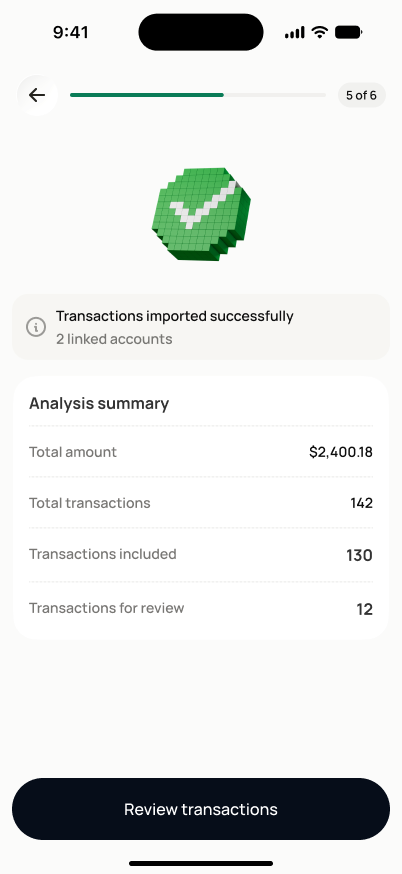
- **Import result**: a brief "Transactions imported successfully" summary (linked accounts, total amount, transaction count) shown before this screen's default review state.
Acceptance criteria
- Each transaction row shows amount, merchant/payee, date, and suggested budget category where available.
- Confirming a transaction includes it in actual project spend.
- Excluding a transaction removes it from spend totals while keeping it visible in the audit record.
- Transactions Dovel is uncertain about are flagged for review, never auto-confirmed.
- Potential duplicate transactions are flagged distinctly from other transactions.
Powered by — endpoints · the Backend agent owns these
GET /transactions/inboxPOST /transactions/inbox/{ob_transaction_id}/confirmPOST /transactions/inbox/{ob_transaction_id}/dismissPOST /open-banking/syncGET /projects/{project_id}/transactions