Sign In
SCR-ONBOARD-02 · Account Onboarding & Profile Setup
ScopedFigma
596:8217design drifted since last syncLayout
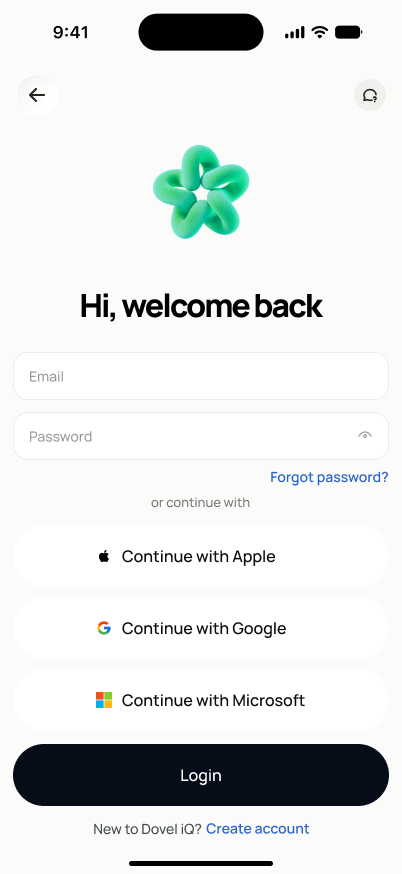
Top nav bar: circular gray back-arrow button (left), circular gray help/chat-bubble button (right). Centered 3D brand mark (green knotted-loop icon). Bold centered headline "Hi, welcome back". Two stacked full-width rounded input fields (Email, then Password — password field has a show/hide eye icon on its right edge). Right-aligned "Forgot password?" link directly below the password field. Large empty space fills the rest of the screen. Full-width solid black "Login" button pinned above the home indicator at the bottom.
States
- **Default**: empty fields, "Sign in" enabled once both fields are non-empty.
- **Field error**: inline message under the email field for invalid format — blocks submit.
- **Auth error**: generic banner/message ("Incorrect email or password") — identical wording regardless of which is wrong, and regardless of whether the email exists.
- **Network error**: "Retry" affordance in place of a blank/frozen screen.
- **Repeated failures**: safe account-recovery message shown after N failed attempts (threshold owned by security, not this doc) — still does not confirm account existence.
Acceptance criteria
- Valid credentials + "Sign in" authenticates and routes to project home.
- Invalid email format is caught client-side before submit, with a field-level message.
- Wrong password shows the same generic error text used for "email not found" — no differentiation visible to the user.
- If the user's profile or first project setup is incomplete, sign-in routes to the last incomplete step instead of project home.
- The password field has a working show/hide toggle.
- A network failure during submit shows "Retry", preserving entered field values.
Powered by — endpoints · the Backend agent owns these
POST /auth/login