Extracting Budget Document
SCR-BUDGET-10 ·
LiveFigma
486:7808Layout
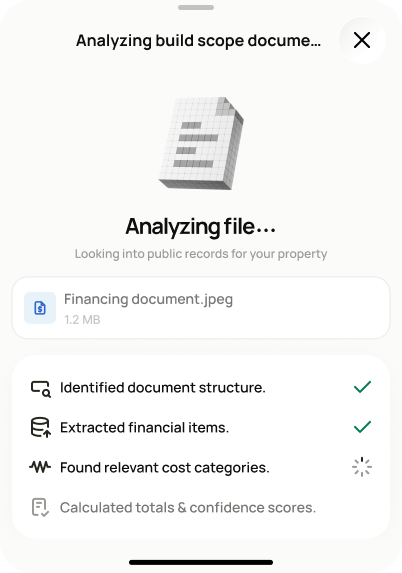
Show extraction progress on an uploaded construction budget document so budget categories and totals can be created automatically.
States
- **In progress**: steps advance one at a time.
- **Success**: screen transitions to SCR-BUDGET-11 with a budget estimate summary and extracted line items; unmatched items flagged for review.
- **Failure**: error state with retry, replace file, or switch-to-manual options.
Acceptance criteria
- After upload, a progress screen shows extraction steps: document structure, financial items, cost categories, totals, and confidence.
- On success, a budget estimate summary is shown with extracted line items (navigates to SCR-BUDGET-11).
- Items that could not be matched to a budget category are flagged for review — they are never silently dropped.
- If extraction fails, I can retry, replace the file (returns to SCR-BUDGET-09), or switch to manual entry (SCR-BUDGET-07).
Endpoints
None mapped yet — the backend agent will own these.