Build Budget Manually
SCR-BUDGET-08 ·
LiveFigma
1544:15228Layout
Let the investor build a detailed construction budget section by section, line item by line item, as the baseline for later variance tracking.
States
- **Default**: template sections/line items pre-populated per selected scope, amounts editable.
- **Editing**: entering an amount updates section total and overall total instantly.
- **Invalid amount**: field-level error for non-positive/invalid currency values.
- **Delete confirmation**: confirmation prompt before removing a line item or section; totals update after deletion.
- **Saved**: complete budget baseline stored.
Acceptance criteria
- The budget builder shows sections (e.g. pre-construction, site & structure, systems & finishes, contingency) with line items inside each.
- Entering an amount on a line item updates the section total and the overall total budget instantly.
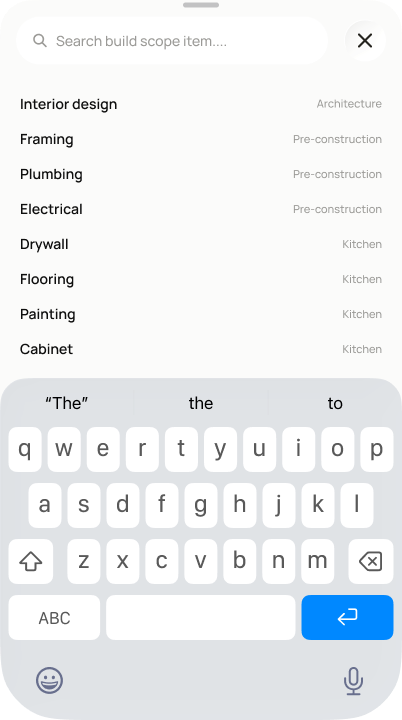
- I can add a new cost line item at any time via a searchable catalog of common build-scope items, each pre-tagged with its section (e.g. framing/plumbing/electrical under Pre-construction).
- Deleting a line item or section asks for confirmation before removing it, and totals update after deletion.
- Tapping "Save and continue" stores the complete budget baseline.
Powered by — endpoints · the Backend agent owns these
GET /costs/estimateGET /projects/{project_id}/budgetPOST /projects/{project_id}/budget/itemsDELETE /projects/{project_id}/budget/items/{item_id}PATCH /projects/{project_id}/budget/items/{item_id}GET /budget/catalog