Review Extracted Purchase Costs
SCR-BUDGET-05 ·
ScopedFigma
412:5642design drifted since last syncLayout
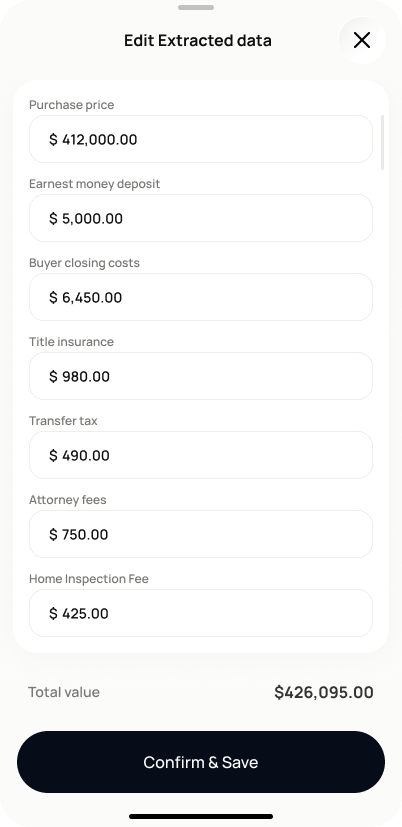
Let the investor review, correct, and confirm extracted purchase cost items before they become part of the project P&L.
States
- **Default**: extracted items listed, flagged items visually distinguished.
- **Editing**: amount/category editable inline or in a modal; saved edit shows a "user-edited" indicator.
- **Needs review**: flagged items remain unreviewed but the user confirmed anyway — the purchase costs section shows "Needs review" rather than "Complete"; this is not an error state.
- **Confirmed**: items written as purchase cost line items, P&L recalculates.
Acceptance criteria
- The screen shows each extracted item (earnest money deposit, buyer closing costs, title insurance, transfer tax, attorney fees) with its name, amount, and a confidence or "needs review" indicator, plus a computed total value.
- Tapping "Edit" on any item lets me change the amount or category before saving.
- Edited values show a "user-edited" indicator so it is clear what I changed.
- Tapping "Confirm and save" writes all confirmed items as purchase cost line items and the P&L recalculates.
- Confirming with unreviewed flagged items does not block — the purchase costs section shows "Needs review" instead of "Complete" until every flagged item is resolved.
- An audit history is kept of the original extracted value and my edits.
Powered by — endpoints · the Backend agent owns these
GET /projects/{project_id}/acquisition-costs