QuickBooks integration
QuickBooks integration · Figma 9256:57789
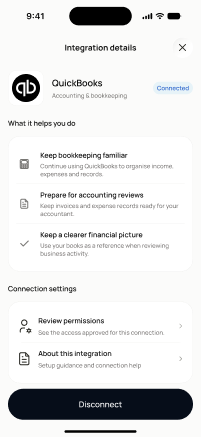
Scopednot in the frontend yetFigma
9256:57789Frontend
No matching Flutter page yet — not built.
Endpoints this screen calls · 1 endpoints, 0 confirmed in code · the Backend agent owns these
GET /settings/integrations
Acceptance criteria · drafted by Product agent
- User can view the QuickBooks integration details, including current connection status and linked company/account info (if connected), when the app calls GET /settings/integrations on screen load.
- User can initiate connecting QuickBooks from this screen via a clear call-to-action (e.g., 'Connect QuickBooks'), and the screen reflects the updated status returned by GET /settings/integrations after the flow completes.
- If QuickBooks is already connected, the user can see management options (e.g., 'Disconnect' or 'Manage') instead of the connect call-to-action.
- If GET /settings/integrations fails, the system displays an error message with a retry option and prevents the user from acting on outdated connection state.
What's on the screen
—