reset-password/new-password
reset-password/new-password · Figma 770:8796
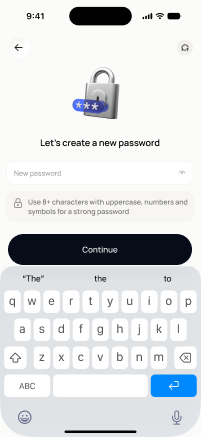
Liveready for devbuilt in the frontendFigma
770:8796Frontend · Frontend agent owns this
Built in
ph_auth → packages/ph_auth/lib/src/presentation/pages/new_password_page.dartEndpoints this screen calls · 1 endpoints, 1 confirmed in code · the Backend agent owns these
POST /auth/reset-password
Acceptance criteria · drafted by Product agent
- User can enter a new password and confirm it; on submit, the app calls POST /auth/reset-password with the verified OTP and new password.
- System validates that the password meets the security policy (e.g., minimum length and character requirements) and that both entries match, showing inline errors otherwise.
- On success, the app shows a confirmation message and redirects the user to the login screen to sign in with the new password.
- On failure (e.g., expired OTP or invalid token), the app shows an error and directs the user back to the appropriate earlier step in the flow.
What's on the screen
—