two-factor-auth
two-factor-auth · Figma 7192:64641
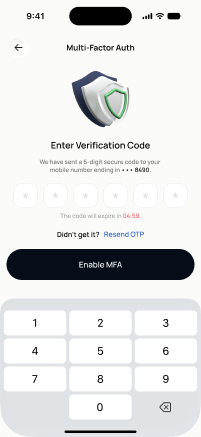
Livebuilt in the frontendFigma
7192:64641Frontend · Frontend agent owns this
Built in
ph_auth → packages/ph_auth/lib/src/presentation/pages/two_factor_page.dartEndpoints this screen calls · 4 endpoints, 0 confirmed in code · the Backend agent owns these
GET /auth/2faPOST /auth/2fa/setupPOST /auth/2fa/enablePOST /auth/2fa/disable
Acceptance criteria · drafted by Product agent
- User can view their current 2FA status when the screen loads via GET /auth/2fa, showing whether MFA is enabled or disabled.
- User can initiate MFA enrollment by tapping 'Set up', which calls POST /auth/2fa/setup and displays a QR code/secret key to scan with an authenticator app.
- On submitting a valid verification code, the app calls POST /auth/2fa/enable and shows a success confirmation with MFA marked as active.
- User can disable MFA by confirming their identity and submitting a valid code, which calls POST /auth/2fa/disable and updates the status to disabled.
What's on the screen
—