log-expense
log-expense · Figma 7006:87733
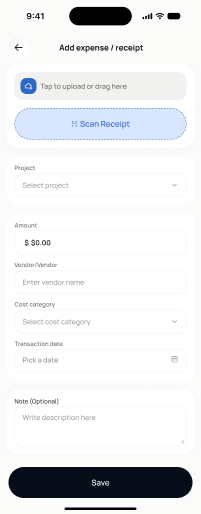
Scopednot in the frontend yetFigma
7006:87733Frontend
No matching Flutter page yet — not built.
Endpoints this screen calls · 2 endpoints, 0 confirmed in code · the Backend agent owns these
POST /projects/{project_id}/transactionsPOST /projects/{project_id}/transactions/receipt-scan/upload-and-analyse
Acceptance criteria · drafted by Product agent
- User can select a project, enter an amount, category, date, and optional note, and on submit the app calls POST /projects/{project_id}/transactions and shows a success confirmation.
- User can upload a receipt photo, which triggers POST /projects/{project_id}/transactions/receipt-scan/upload-and-analyse and displays extracted fields (amount, merchant, date) for review before saving.
- System validates required fields (project, amount > 0, valid date) and blocks submission with inline error messages until they are satisfied.
- On successful save, the app returns the user to the home screen with the new expense reflected in the project's activity and a toast confirmation.
What's on the screen
—