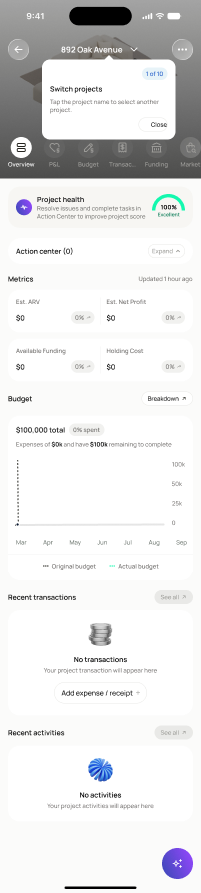
Flows / Project overview & quick actions / project-overview/no-actions/no-activities/no-project-image
project-overview/no-actions/no-activities/no-project-image
project-overview/no-actions/no-activities/no-project-image · Figma 6119:36425
Scopednot in the frontend yetFigma
6119:364252 design statesFrontend
No matching Flutter page yet — not built.
Endpoints this screen calls · 4 endpoints, 0 confirmed in code · the Backend agent owns these
GET /projects/{project_id}GET /projects/{project_id}/overviewGET /projects/{project_id}/activityGET /actions
Acceptance criteria · drafted by Product agent
- Given a project with no activities, no actions, and no project image, when the user opens the project overview, the app calls GET /projects/{project_id}, GET /projects/{project_id}/overview, GET /projects/{project_id}/activity, and GET /actions and renders empty states for each section instead of blank space.
- Given the project has no image, the overview displays a placeholder project image and the user can still access all project-level sections.
- Given any of the overview endpoints returns an error, the app shows an error state for the affected section without blocking the rest of the overview.
What's on the screen
—