add-account/card
add-account/card · Figma 5093:45604
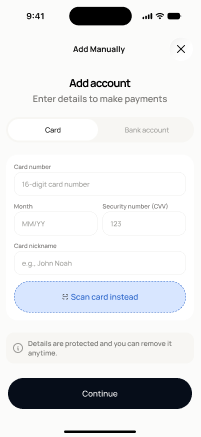
Scopednot in the frontend yetFigma
5093:45604Frontend
No matching Flutter page yet — not built.
Endpoints this screen calls · 2 endpoints, 0 confirmed in code · the Backend agent owns these
POST /open-banking/link-tokenPOST /wallet/setup-intent
Acceptance criteria · drafted by Product agent
- User can choose to add a bank account (via Plaid) or a payment card from the add-account/card screen.
- If the user selects bank account, the app calls POST /open-banking/link-token to initiate the Plaid Link flow; if the user selects card, the app calls POST /wallet/setup-intent to tokenize the card via the payment processor.
- System validates required card fields (number, expiry, CVV) before calling POST /wallet/setup-intent, and surfaces inline validation errors without submitting.
- On success, the app navigates the user to the appropriate next step (Plaid Link for bank, manual card entry confirmation for card) and reflects the pending account/card in the wallet.
What's on the screen
—