project-setup/guided-full/step-5/link-account
project-setup/guided-full/step-5/link-account · Figma 504:7237
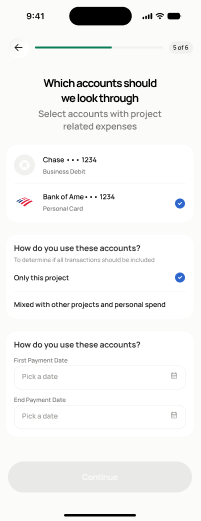
Scopedready for devnot in the frontend yetFigma
504:72376 design statesFrontend
No matching Flutter page yet — not built.
Endpoints this screen calls · 4 endpoints, 0 confirmed in code · the Backend agent owns these
POST /open-banking/link-tokenPOST /open-banking/linkGET /open-banking/accountsPOST /projects/{project_id}/reconciliation/configure
Acceptance criteria · drafted by Product agent
- On entry, the app calls POST /open-banking/link-token and POST /open-banking/link to establish the bank connection.
- After linking, the app calls GET /open-banking/accounts to display the user's available accounts for selection.
- User can select which account(s) to use for reconciliation; on confirm the app calls POST /projects/{project_id}/reconciliation/configure to bind the account to the project.
- On configuration success, the user advances to the transaction extraction screen (screen 28).
What's on the screen
—