project-setup/guided-full/step-5/link-account/manual card
project-setup/guided-full/step-5/link-account/manual card · Figma 504:6720
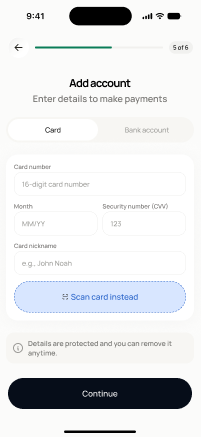
Scopedready for devnot in the frontend yetFigma
504:6720Frontend
No matching Flutter page yet — not built.
Endpoints this screen calls · 2 endpoints, 0 confirmed in code · the Backend agent owns these
POST /wallet/setup-intentGET /wallet/payment-methods
Acceptance criteria · drafted by Product agent
- User can add a card manually by entering card details; the app calls POST /wallet/setup-intent to tokenize the card securely.
- On success, the app calls GET /wallet/payment-methods to refresh and display the newly added card.
- System never stores raw card data client-side; only tokenized references are handled.
- User can proceed to card scan (screen 40) or finish wallet setup.
What's on the screen
—