project-setup/guided-full/step-4/financing/constrution-budget
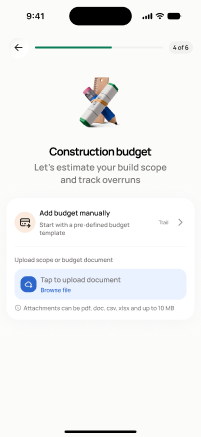
project-setup/guided-full/step-4/financing/constrution-budget · Figma 466:6071
Scopedready for devnot in the frontend yetFigma
466:60713 design statesFrontend
No matching Flutter page yet — not built.
Endpoints this screen calls · 3 endpoints, 0 confirmed in code · the Backend agent owns these
GET /projects/{project_id}/budgetPATCH /projects/{project_id}/budgetGET /budget/catalog
Acceptance criteria · drafted by Product agent
- On load, the app calls GET /projects/{project_id}/budget and GET /budget/catalog to display the construction budget with category structure.
- User can edit budget line items and section allocations; on save the app calls PATCH /projects/{project_id}/budget with the changes.
- System validates that budget totals are non-negative and shows errors on invalid entries.
- User can choose to upload a budget document instead (screen 21).
What's on the screen
—