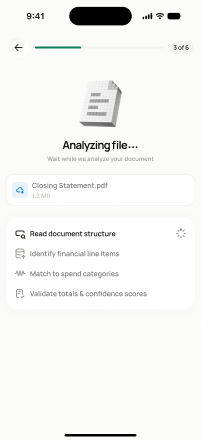
project-setup/guided-full/step-3/analyzing-file
project-setup/guided-full/step-3 · Figma 336:47851
Scopedready for devnot in the frontend yetFigma
336:478514 design statesFrontend
No matching Flutter page yet — not built.
Endpoints this screen calls · 1 endpoints, 0 confirmed in code · the Backend agent owns these
POST /projects/{project_id}/budget/document/{media_item_id}/analyze
Acceptance criteria · drafted by Product agent
- On entering this screen, the app calls POST /projects/{project_id}/budget/document/{media_item_id}/analyze to begin analyzing the uploaded scope document.
- System shows a progress/analyzing state and disables navigation until analysis completes or fails.
- On success, the user is routed to the extracted-data review screen (screen 11); on failure, the user can retry or proceed manually.
What's on the screen
—