project-setup/guided-full/step-2/P&L-capturing
project-setup/guided-full/step-2/P&L-capturing · Figma 336:47768
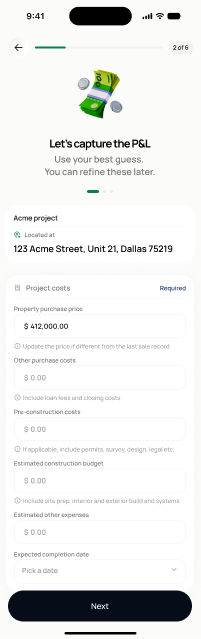
Scopedready for devnot in the frontend yetFigma
336:477683 design statesFrontend
No matching Flutter page yet — not built.
Endpoints this screen calls · 6 endpoints, 0 confirmed in code · the Backend agent owns these
GET /projects/{project_id}/deal-detailsPOST /projects/{project_id}/deal-detailsGET /projects/{project_id}/profitability-detailsPOST /projects/{project_id}/profitability-detailsGET /projects/{project_id}/exit-planPOST /projects/{project_id}/exit-plan
Acceptance criteria · drafted by Product agent
- On load, the app fetches existing values via GET /projects/{project_id}/deal-details, GET /projects/{project_id}/profitability-details, and GET /projects/{project_id}/exit-plan, pre-filling purchase price, rehab/holding assumptions, and exit strategy fields.
- User can edit deal details, profitability assumptions, and exit plan; on save the app calls the corresponding POST endpoints (deal-details, profitability-details, exit-plan).
- System validates numeric inputs (e.g., purchase price > 0, valid ARV assumptions) and blocks progression on invalid values.
- On completion, the user advances to Step 3 (build scope).
What's on the screen
—