add-paid-expense
add-paid-expense · Figma 2465:11596
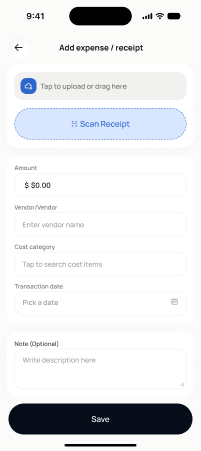
Scopednot in the frontend yetFigma
2465:11596Frontend
No matching Flutter page yet — not built.
Endpoints this screen calls · 3 endpoints, 0 confirmed in code · the Backend agent owns these
POST /projects/{project_id}/transactionsPOST /projects/{project_id}/transactions/receipt-scan/upload-and-analysePOST /projects/{project_id}/transactions/receipt-scan/{media_item_id}/confirm
Acceptance criteria · drafted by Product agent
- User can record a paid expense manually (amount, date, vendor, category) and on submit the app calls POST /projects/{project_id}/transactions and confirms the expense was recorded.
- User can upload a receipt photo, which triggers POST /projects/{project_id}/transactions/receipt-scan/upload-and-analyse and shows a scanning/processing state while analysis runs.
- After analysis, the user can review extracted fields (amount, date, vendor, line items), edit any incorrect values, and on confirm the app calls POST /projects/{project_id}/transactions/receipt-scan/{media_item_id}/confirm to create the transaction.
- If receipt analysis fails or returns low-confidence data, the user can still complete the expense manually without losing the uploaded media item.
What's on the screen
—