add-financing/credit-line/upload
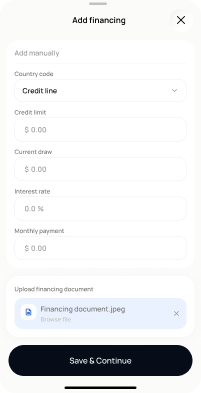
add-financing/credit-line/upload · Figma 2333:23261
Scopednot in the frontend yetFigma
2333:23261Frontend
No matching Flutter page yet — not built.
Endpoints this screen calls · 4 endpoints, 0 confirmed in code · the Backend agent owns these
POST /projects/{project_id}/financing-costs/credit-linePOST /projects/{project_id}/financing-costs/documentPOST /projects/{project_id}/financing-costs/document/upload-and-analysePOST /projects/{project_id}/financing-costs/document/{media_item_id}/analyze
Acceptance criteria · drafted by Product agent
- User can upload one or more supporting documents for the credit line; on upload the app calls POST /projects/{project_id}/financing-costs/document and then POST /projects/{project_id}/financing-costs/document/upload-and-analyse.
- System displays an analysis-in-progress state while POST /projects/{project_id}/financing-costs/document/{media_item_id}/analyze runs, and shows extracted/analysed results when complete.
- System rejects unsupported file types or oversized files with a clear validation message before any upload request is made.
- If upload or analysis fails, the app shows an error with a retry option and keeps the credit line record intact.
What's on the screen
—