add-financing/credit-line
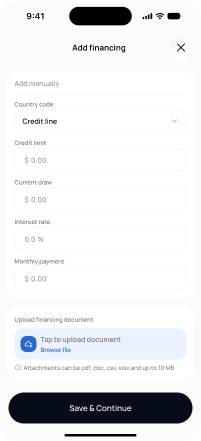
add-financing/credit-line · Figma 2333:23205
Livebuilt in the frontendFigma
2333:23205Frontend · Frontend agent owns this
Built in
ph_projects → packages/ph_projects/lib/src/presentation/pages/full/add_financing_page.dartEndpoints this screen calls · 1 endpoints, 0 confirmed in code · the Backend agent owns these
POST /projects/{project_id}/financing-costs/credit-line
Acceptance criteria · drafted by Product agent
- User can enter credit line details (lender name, credit limit, drawn amount, interest rate) and on submit the app calls POST /projects/{project_id}/financing-costs/credit-line and shows a success confirmation.
- System validates required fields (e.g., lender name and credit limit) before enabling the submit action, and displays inline errors for invalid or missing values.
- On successful save, the credit line appears as a funding source on the project and the user can navigate to the upload step to attach supporting documents.
- On API failure, the app shows a non-blocking error message and preserves the user's entered values.
What's on the screen
—