add-paid-expense
add-paid-expense · Figma 1563:22436
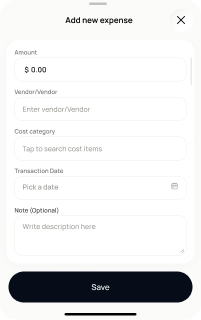
Scopedready for devnot in the frontend yetFigma
1563:22436Frontend
No matching Flutter page yet — not built.
Endpoints this screen calls · 3 endpoints, 0 confirmed in code · the Backend agent owns these
POST /projects/{project_id}/transactionsPOST /projects/{project_id}/transactions/receipt-scan/upload-and-analysePOST /projects/{project_id}/transactions/receipt-scan/{media_item_id}/confirm
Acceptance criteria · drafted by Product agent
- User can add a paid expense manually or by scanning a receipt; manual entry calls POST /projects/{project_id}/transactions.
- For receipt scan, the app calls POST /projects/{project_id}/transactions/receipt-scan/upload-and-analyse to extract expense details from the image.
- User can review and confirm the extracted receipt data; on confirm the app calls POST /projects/{project_id}/transactions/receipt-scan/{media_item_id}/confirm to save the expense.
- On success, the user is shown the category-added confirmation state (screen 35).
What's on the screen
—